

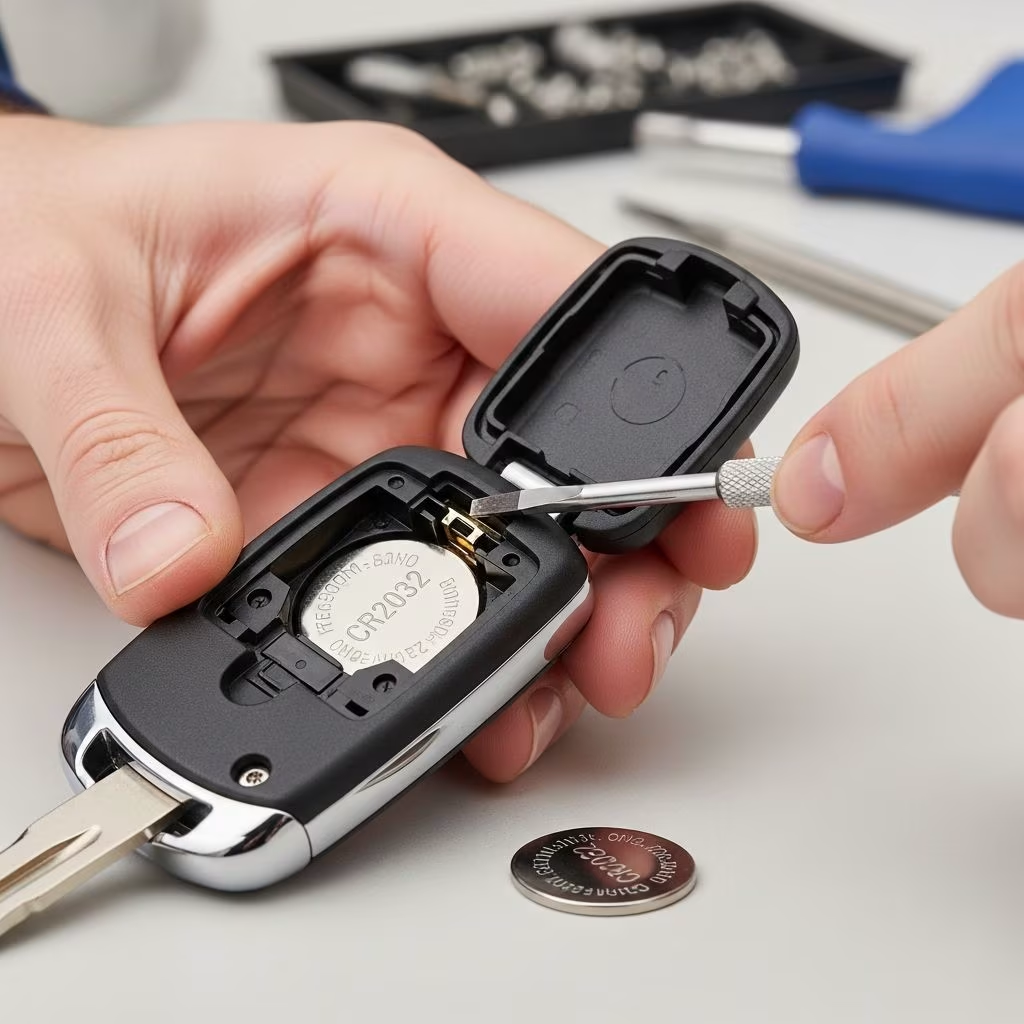
Modern vehicles rely heavily on key fobs for keyless entry, remote start, and security features. When the battery dies, you might notice reduced range, intermittent functionality, or warning lights on your dashboard. Replacing the battery is a quick DIY task that takes under 10 minutes and costs just a few dollars, far cheaper than a dealership service.
Why Your Key Fob Battery Needs Replacing
Key fob batteries typically last 2-3 years, depending on usage frequency and environmental factors like extreme temperatures. Signs of a failing battery include buttons that only work when held close to the car, a low-battery warning symbol on the fob or dashboard, or complete failure to lock/unlock doors. Proactive replacement prevents lockouts and ensures reliable access to your vehicle.
Common battery types are coin-cell lithium batteries such as CR2032, CR2025, or CR2016. Always verify the exact type by checking your owner’s manual or inspecting the old battery, as using the wrong size can damage internal circuits.
Essential Tools and Materials
Gathering the right items beforehand makes the process smooth and safe. Here’s what you’ll need:
- Replacement battery: CR2032 is most common; buy from reputable auto parts stores for freshness.
- Prying tool: Small flathead screwdriver, coin, or plastic pry tool to avoid scratching the fob.
- Clean cloth: For handling the battery and wiping residue.
- Owner’s manual: For model-specific instructions.
- Optional: Magnifying glass or phone camera for close inspection of tiny components.
Avoid metal tools that could short-circuit internals; opt for non-conductive alternatives when possible.
Universal Step-by-Step Instructions
While designs vary by manufacturer, these steps apply to most key fobs. Proceed gently to prevent cracking the plastic housing.
- Locate the access point: Look for a small notch, slot, or seam on the side or bottom of the fob. Some models have a hidden release button or screw.
- Open the housing: Insert your prying tool into the notch and gently twist or slide to separate the halves. Work around the edges if needed, applying even pressure. For fobs with a physical key, remove it first via a slide switch or button.
- Extract the old battery: Note the orientation (positive side up usually marked with +). Use the prying tool or your fingernail to lift it out carefully. Dispose of it properly as these are small lithium cells.
- Insert the new battery: Match the polarity exactly. Press it firmly into place without bending contacts.
- Reassemble: Snap the halves together until you hear a click. Ensure no gaps remain to keep out moisture.
- Test functionality: Stand 10-20 feet from your car and press all buttons. If it fails, reopen and check battery seating or contacts.
| Step | Common Pitfalls | Tips |
|---|---|---|
| Opening Housing | Excessive force cracks plastic | Use coin for delicate fobs |
| Battery Insertion | Wrong polarity damages circuit | Photo old battery first |
| Reassembly | Loose fit allows water entry | Press all edges firmly |
| Testing | Weak signal persists | Try near car first, then distance |
Vehicle-Specific Variations
Different brands have unique designs. Here’s how to handle popular models:
Ford Vehicles
Ford fobs often use CR2032 batteries. Pry the seam with a screwdriver after checking your manual for type. Insert new battery positive side up, then snap shut and test range.
Honda Models
Some Honda fobs have a tiny Phillips screw; unscrew it first. For keyless types, wedge the physical key into a slot to pry apart. Polarity is critical—positive faces up.
General Tips for Others
Subaru or Toyota may require sliding out an inner tray. If your fob has a rubber cover, peel it back gently. Videos from auto parts experts confirm prying from a notch works universally.
Safety Precautions and Best Practices
Handle lithium batteries with care: they can cause burns if punctured. Wash hands after touching and keep away from children/pets. Work in a well-lit area to avoid dropping tiny parts.
- Touch a grounded metal surface to discharge static electricity before handling internals.
- Clean corroded contacts with a dry cloth or isopropyl alcohol on a swab.
- If the fob gets wet, let it dry fully before reassembly.
- For smart keys with immobilizers, battery replacement won’t erase programming.
After replacement, some cars display a dashboard alert briefly—drive a cycle to clear it.
Troubleshooting Common Issues
Not every replacement goes perfectly. Here’s how to fix problems:
- Fob won’t respond: Reopen and reseat battery; clean contacts.
- Short range only: Battery not fresh—replace again or check antenna wire.
- Buttons sticky: Internal damage; consider professional service.
- No click on reassembly: Align tabs precisely; use tape temporarily if needed.
- Warning light persists: Normal for 1-2 drives; consult manual if longer.
If issues persist post-replacement, the circuit board may be faulty—time for a dealer or locksmith.
Cost Savings and Longevity Tips
DIY costs $5-10 versus $50-150 at a dealer. Extend battery life by:
- Carrying the fob in a metal pouch to block signals when not in use.
- Avoiding extreme heat/cold exposure.
- Disabling unused remote features via car settings.
- Replacing annually if high usage.
Stock spares in your glovebox for peace of mind.
FAQs
What battery does my key fob use?
Most use CR2032; check the old one or manual. Variations exist by model.
Can I use any CR2032 battery?
Yes, but choose name-brand for reliability and exact voltage (3V).
Will replacing the battery reset my key fob?
No, programming remains intact for standard remotes.
What if I break the fob during replacement?
Dealers sell replacements; aftermarket options work but may need programming.
How often should I replace it?
Every 2 years or at first sign of weakness.
Is it safe for leased cars?
Yes, it’s non-invasive maintenance.
Mastering key fob battery replacement empowers you to handle this routine task independently, keeping your vehicle accessible without hassle.
References
- Ford Key Fob Battery Replacement Guide — McGrath Ford. 2023-10-15. https://www.mcgrathford.com/how-to-change-the-battery-in-your-ford-key-fob.htm
- How To: Replace a Key Fob Battery — O’Reilly Auto Parts (YouTube). 2025-01-01. https://www.youtube.com/watch?v=hl7SrQ-FrU4
- How to: Change a Keyfob Battery — Honda Tutorial (YouTube). 2022-05-20. https://www.youtube.com/watch?v=WUqWCEXSXaU
- How To Replace Install Battery Car Key Fob Remote Easy Simple — Auto DIY (YouTube). 2023-08-12. https://www.youtube.com/watch?v=1VYVkMuoRv8
This article is general information, not personal financial advice. Consider your own situation, or speak with a licensed adviser, before acting on it.


